80s Photo
80s Photo studio

90s Photo Generator & Retro Prompt

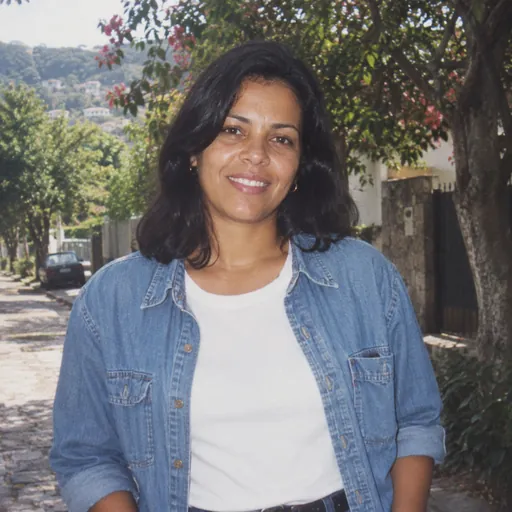
Move the clock forward a decade. A casual denim layer, a simple setting and direct flash create a different mood from a glamorous 80s studio portrait.

Your photo, your throwback

Photo studio
1JPG, PNG, WebP · 10 MB
2Choose your 80s look

Changes clothes and scenery for this look, while keeping your face and pose.

Adjust details (optional)0/400 · No prompt needed to get started.
90s throwback prompt

Reimagine the person in the reference photo in a 1990s casual film snapshot. Use a denim overshirt, natural hair, a simple outdoor setting, direct flash and restrained disposable-camera grain. Avoid 1980s laser backgrounds and exaggerated glamour styling. Preserve every person’s recognizable facial features, skin tone, age, body proportions and expression. Do not beautify, replace, add, remove or merge people. Keep natural skin texture. Make only the styling changes explicitly requested by the selected preset. No added text, logos or watermarks. Keep the original pose, gaze, person-to-person spacing, camera angle and framing. Do not introduce props or change the scene beyond the explicit preset instructions.

Prompt for use in your favorite image tool.
3Pick a shape

Matches the closest supported format to your photo.

1 free portrait per day · No account needed · Daily capacity applies

A little inspirationAI-created style sample
AI-created style sample: 90s throwback
90s throwback’86
80s Photo
Studio

Denim, flash and a new decade.

Pick a look, bring your own face, and make it personal.

Original AI style examples. Your photo supplies the people; the preset supplies the look.

90s throwback prompt

Reimagine the person in the reference photo in a 1990s casual film snapshot. Use a denim overshirt, natural hair, a simple outdoor setting, direct flash and restrained disposable-camera grain. Avoid 1980s laser backgrounds and exaggerated glamour styling. Preserve every person’s recognizable facial features, skin tone, age, body proportions and expression. Do not beautify, replace, add, remove or merge people. Keep natural skin texture. Make only the styling changes explicitly requested by the selected preset. No added text, logos or watermarks. Keep the original pose, gaze, person-to-person spacing, camera angle and framing. Do not introduce props or change the scene beyond the explicit preset instructions.

Prompt for use in your favorite image tool.

Choose a 90s scene

A casual outdoor snapshot, a simple yearbook portrait or an understated music-inspired look all work. Describe one scene instead of mixing grunge clothing, formal studio lighting and neon lasers.

Use a restrained film finish

Ask for slight grain and modest contrast. Heavy scratches, blur and orange overlays can hide the face rather than make the image feel authentic.

Try the same reference in two decades

Compare this prompt with the classic studio prompt. Keep the same source photo and framing, then change only the styling to see which direction suits you.

Ready for your close-up?

Open the photo studio