80s Photo
80s Photo studio

80s Bollywood Photo Generator & Prompt

Warm golden light, rich color and an elegant studio pose bring a cinema-inspired mood to your portrait. The look draws on period styling without turning you into a specific actor.

Your photo, your throwback

Photo studio
1JPG, PNG, WebP · 10 MB
2Choose your 80s look

Changes clothes and scenery for this look, while keeping your face and pose.

Adjust details (optional)0/400 · No prompt needed to get started.
Bollywood studio prompt

Create an Indian 1980s cinema-inspired studio portrait of the person in the reference photo. Use elegant period clothing, voluminous hair, a burgundy backdrop, warm golden lighting and subtle film texture. Do not imitate a specific actor. Preserve every person’s recognizable facial features, skin tone, age, body proportions and expression. Do not beautify, replace, add, remove or merge people. Keep natural skin texture. Make only the styling changes explicitly requested by the selected preset. No added text, logos or watermarks. Keep the original pose, gaze, person-to-person spacing, camera angle and framing. Do not introduce props or change the scene beyond the explicit preset instructions.

Prompt for use in your favorite image tool.
3Pick a shape

Matches the closest supported format to your photo.

1 free portrait per day · No account needed · Daily capacity applies

A little inspirationAI-created style sample
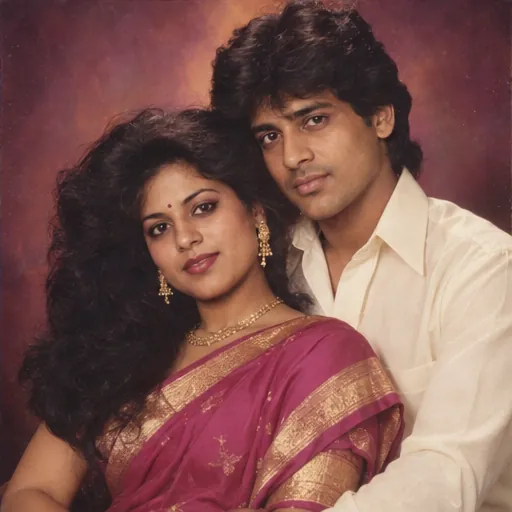
AI-created style sample: Bollywood studio
Bollywood studio’86
80s Photo
Studio

A little silver-screen magic.

Pick a look, bring your own face, and make it personal.

Original AI style examples. Your photo supplies the people; the preset supplies the look.

Bollywood studio prompt

Create an Indian 1980s cinema-inspired studio portrait of the person in the reference photo. Use elegant period clothing, voluminous hair, a burgundy backdrop, warm golden lighting and subtle film texture. Do not imitate a specific actor. Preserve every person’s recognizable facial features, skin tone, age, body proportions and expression. Do not beautify, replace, add, remove or merge people. Keep natural skin texture. Make only the styling changes explicitly requested by the selected preset. No added text, logos or watermarks. Keep the original pose, gaze, person-to-person spacing, camera angle and framing. Do not introduce props or change the scene beyond the explicit preset instructions.

Prompt for use in your favorite image tool.

Choose a visual direction

Try a magenta sari with gold jewelry, a tailored period suit or a simple shirt under warm studio light. Describe the outfit you want rather than leaving every detail to the model.

Light makes the difference

A burgundy backdrop and warm side lighting create depth. Keep skin texture natural and ask the model to preserve the original skin tone rather than lightening it.

For a couple portrait

Use a clear photograph of both people. Add a request to keep both faces recognizable and use coordinated period clothing. Review each person separately in the result.

Ready for your close-up?

Open the photo studio