80s Photo
80s Photo studio

80s Floating Head Photo Generator

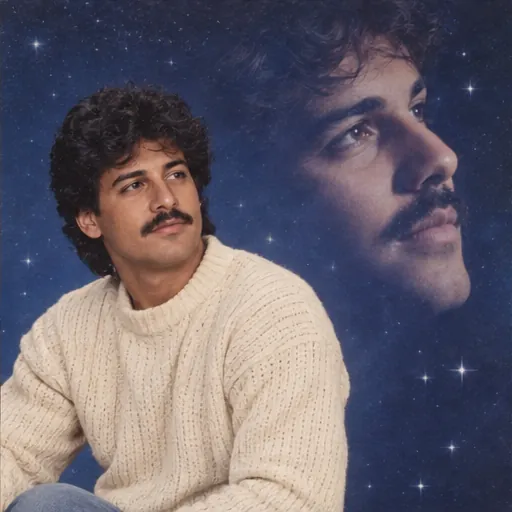
One portrait, two versions of you: a seated studio pose and an oversized floating profile. The deliberately awkward double exposure is the whole point.

Your photo, your throwback

Photo studio
1JPG, PNG, WebP · 10 MB
2Choose your 80s look

Restages the portrait and adds a second profile of the same person.

Adjust details (optional)0/400 · No prompt needed to get started.
Floating head prompt

Create an intentionally awkward 1980s double-exposure studio portrait of the person in the reference photo. Place the same person seated in a cream sweater in the lower-left foreground and a larger softly translucent side-profile of their own face in the upper-right background. Use a deep blue starry studio backdrop, soft airbrushed light and subtle film grain. Both faces must be clearly the same person; add no other people. Preserve every person’s recognizable facial features, skin tone, age, body proportions and expression. Do not beautify, replace, add, remove or merge people. Keep natural skin texture. Make only the styling changes explicitly requested by the selected preset. No added text, logos or watermarks. The second translucent profile is a deliberate repeat of the same person, not another person. Preserve the original expression and facial proportions in both views.

Prompt for use in your favorite image tool.
3Pick a shape

Matches the closest supported format to your photo.

1 free portrait per day · No account needed · Daily capacity applies

A little inspirationAI-created style sample
AI-created style sample: Floating head
Floating head’86
80s Photo
Studio

The wonderfully awkward double exposure.

Pick a look, bring your own face, and make it personal.

Original AI style examples. Your photo supplies the people; the preset supplies the look.

Floating head prompt

Create an intentionally awkward 1980s double-exposure studio portrait of the person in the reference photo. Place the same person seated in a cream sweater in the lower-left foreground and a larger softly translucent side-profile of their own face in the upper-right background. Use a deep blue starry studio backdrop, soft airbrushed light and subtle film grain. Both faces must be clearly the same person; add no other people. Preserve every person’s recognizable facial features, skin tone, age, body proportions and expression. Do not beautify, replace, add, remove or merge people. Keep natural skin texture. Make only the styling changes explicitly requested by the selected preset. No added text, logos or watermarks. The second translucent profile is a deliberate repeat of the same person, not another person. Preserve the original expression and facial proportions in both views.

Prompt for use in your favorite image tool.

Start with one clear face

Use a front-facing portrait of one person, without sunglasses. The model creates a second view of the same person. Avoid group photos for this preset.

Leave room for the profile

Portrait 2:3 leaves space for the floating head above the shoulders. Keep the background simple and ask for soft transparency so the faces do not collide.

Make the joke work

Choose a serious expression, a plain knit sweater and a starry blue backdrop. Check that both faces resemble the source and that the smaller portrait has natural hands.

Ready for your close-up?

Open the photo studio